VST (Virtual Studio Technology)
"Music expresses what cannot be put into words and what cannot remain unsaid."
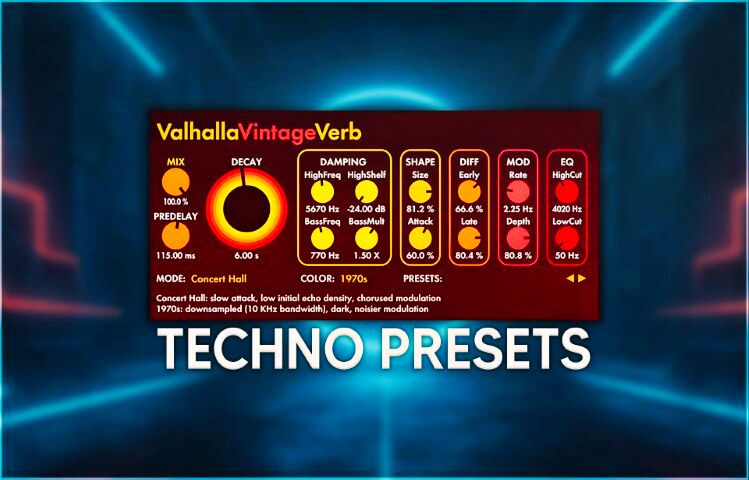
VST stands for Virtual Studio Technology. It's a standard, developed by Steinberg, for software plugins that add virtual instruments (VSTi) and effects (VSTfx) to recording software (DAWs). This allows you to use digital synthesizers, samplers, or effects like reverb in your music productions.
Key details about VST:
Origin: Introduced in 1996 by Steinberg in Cubase 3.02.
Function: It simulates traditional studio-grade hardware in the digital world (plugins).
Types: There are VST instruments (which produce sound, such as a virtual piano) and VST effects (which process sound, such as EQ or compression).
Versions: VST2 (.dll) and the newer standard VST3 (.vst3).
It has become an essential technology for modern music production, allowing producers to use thousands of instruments and effects on their computers.
Virtual studio technology.
VST is a type of plugin that loads into your DAW.
There are two different types of VST plugins: effects and virtual instruments.
The first category, VST effects, is used to modify vocals or instruments and add effects for a better performance. Imagine you have a vocal part that needs some reverb, or a guitar that needs a wah-wah effect for a big solo. You then choose a specific plugin to apply the changes. Some plugins allow you to do this while recording, while others require you to apply the effects afterward to one or more inputs and outputs.
The other type of VST plugin is virtual instruments. This means you can use your computer to simulate musical instruments you don't actually have. So if you need a large brass section or a funky percussion instrument, you can achieve all that using VST instruments.
Whether you use VST effects or instrument plugins, they both work the same way. The VST plugin has become a standard in the music industry.
The only DAWs that don't use or accept any of the various versions of VST plugins are Pro Tools and Logic. Pro Tools has its own AAX (Avid Audio eXtension) plugins, and Logic uses AU plugins. Apart from that, all other major DAWs work with VSTs.
This ranges from free software like Audacity to advanced programs like Adobe Audition and Cubase.
The exact number of VST (Virtual Studio Technology) music plugins is difficult to determine, as new ones are developed daily by both large companies and independent developers.
However, there are strong indications of their scale:
Tens to hundreds of thousands: There are now many thousands of VST plugins.
KVR Audio Database: One of the largest databases (KVR Audio) contains over 20,600 individual products, including effects and instruments.
Active distribution: According to market analysis, more than 4,000 VST plugins are actively distributed and used.
Free plugins: There are hundreds, if not thousands, of options available for "free" VSTs alone.
What are the most popular?
The following VST instruments and effects (often VST3) are well-known among producers:
Synthesizers: Serum, Sylenth1, Massive, Omnisphere, Arturia V Collection.
Samplers: Kontakt.
Effects: FabFilter Pro-Q3, Waves bundles, Valhalla DSP.
In conclusion, there's no limit to what's available; the selection is constantly growing, with thousands of professional options and a nearly endless number of free or inexpensive tools.
VST3 plugins are a more recent version of VST with new features. They were introduced in 2008 and continue the development of the standard. However, there are some important differences between the older VST standard and the newer VST3 standard.
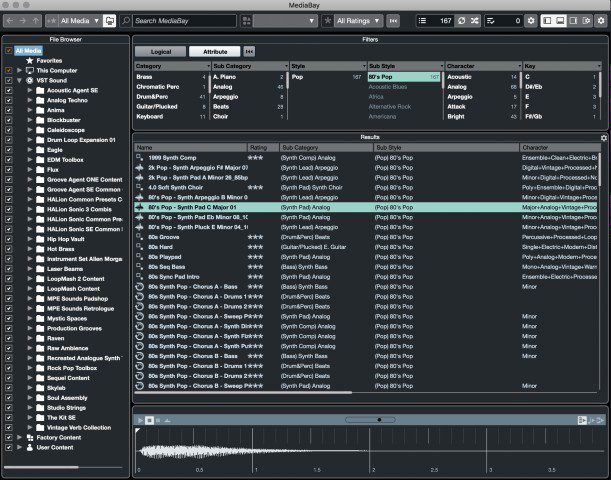
Since I only use Cubase and FL Studio as a DAW, here are some useful videos to manage/maintain/clean up your plugins.
Are VST and VSTi the same?
Yes and no. VST and VSTi belong to the same technology family (Virtual Studio
Technology), but they refer to two different types of plugins within that
family. They both fall under Virtual Studio Technology (developed by
Steinberg), but they serve different functions in your digital audio
workstation (DAW).
The main difference: VST (Effects): This often refers to a VST effect plugin
(sometimes called VSTfx). These plugins process existing sounds, such as
reverbs, compressors, and delays.
VSTi (Instruments): This stands for VST Instrument. These plugins generate
sounds based on MIDI data, such as virtual synthesizers, drum machines, and
samplers.
In summary:
VSTi is a VST, but not every VST is a VSTi. VST = Audio processor (effect).
VSTi = Sound generator (instrument).
Both types are loaded into your DAW (such as Ableton, FL Studio, or Cubase) in
the same way and used to expand the capabilities of your music production
software. As a music producer, it's important to understand the difference
between these two. Therefore, I'll explain the difference between VST and VSTi
in detail below.
As a music producer, it's important to understand and know
the difference between the two.
When you first open your DAW you'll have a range of stock instruments and audio
effects to choose from, however, these can be limiting in terms of quality. A
VST plugin allows you to integrate third-party audio effects and instruments
into your DAW, which can be used to.
Expand your sound palette with additional instruments and effects Save time
with pre-configured effect chains and presets Bring a more professional and
creative flair to your music. Almost all music producers use VST plugins today.
As technology has progressed, VSTs have become better at emulating hardware
devices and are arguably used more often. In our home studios, we solely use
VST and VSTi plugins.
Compared to a hardware device, the cost of such plugins is significantly
cheaper and their almost equal level of quality makes them an obvious choice.
What's The Difference Between VST, VST2 & VST3
Plugins?
VST, VST2, and VST3 are all versions of Steinberg's Virtual Studio Technology
but with important differences and improvements between each.
VSTs were first on the scene in 1996 and were developed by the music technology
company Steinberg, who also make the digital audio workstation, Cubase.
VST allowed you to integrate software versions of hardware audio processors
into your digital audio workstation, giving it new audio processing capabilities,
providing different compression tools, EQ, reverb and more!
With the turn of 1999 came VST 2.0, which bought us the invention of VSTi
plugins (or VST instrument plugins controlled using MIDI).
This upgraded the ability of the original VST effects plugins format, allowing
plugins to receive MIDI data and generate audio, which introduced virtual
instruments to the world.
Although VST3 has been around since 2008, there is still some confusion about
the differences between each software. What's more, with Steinberg officially
no longer supporting VST2, and many developers releasing VST3-only versions of
their plugins, lots of music producers wonder if they should still be using
VST2 software at all?
As mentioned before, VST is the first instance of Virtual Studio technology.
Although it was revolutionary and changed music production at the time, it does
have some drawbacks.
Some of the limitations of VST were that they couldn't process audio data in
64-bit format, only worked by processing audio and were unable to take an
input, and were not very economical when it came to CPU usage.
VST2: introduction of VSTi VST2 added the ability to input MIDI data and then
output the data as audio. Again this took the world of digital music creation
to the next level through the introduction of virtual instruments.
One limitation of VST2 however, was the fact that you could only have one mid
input/output at the same time. Another was that due to the nature of MIDI
controller information, articulation data meant for one note would also affect
any simultaneous notes on the same track. This meant that if you wanted to
apply a controller message, such as pitch bend, to just one note within a
chord, this would not be possible and the modulation would be applied to all
notes in the chord.
VST3: 64-bit & many improvements VST3 improved upon VST and VST2 in
numerous ways.
As well as being able to process audio data in 64-bit, VST3 also made CPU usage
more efficient by only applying processing to plugins when their inputs are
receiving an audio signal, rather than constantly processing plugins and
affecting CPU performance.
It also allowed for adaptive inputs/outputs rather than a fixed amount.
Although before you had to run multiple instances of a plugin for stereo and
surround processing, VST3 can adapt to the channel figuration it's inserted on.
For example, if you insert a plugin onto a stereo channel it will automatically
adapt to stereo mode, or switch to 6 channels when inserted onto a 5.1 channel.
VST3 also included the capability for audio inputs on instrument tracks. Let's
say you have a synth plugin with a vocoder effect and you want to modulate a
separate audio track with that effect. By adding audio inputs to VST
instruments, VST3 allows you to route an audio signal to the input of a VST3
instrument and use it for modulation, allowing you to modulate your audio track
with the synths vocoder effect.
To tackle the limitations of MIDI controller events, VST3 has a dedicated event
handling bus allowing you to go beyond the functionalities of traditional
simple MIDI messages. This lets you apply modulation information for individual
note events, even in polyphonic arrangements, so applying controller messages
like pitch bend to one note in a chord is now possible thanks to VST3.